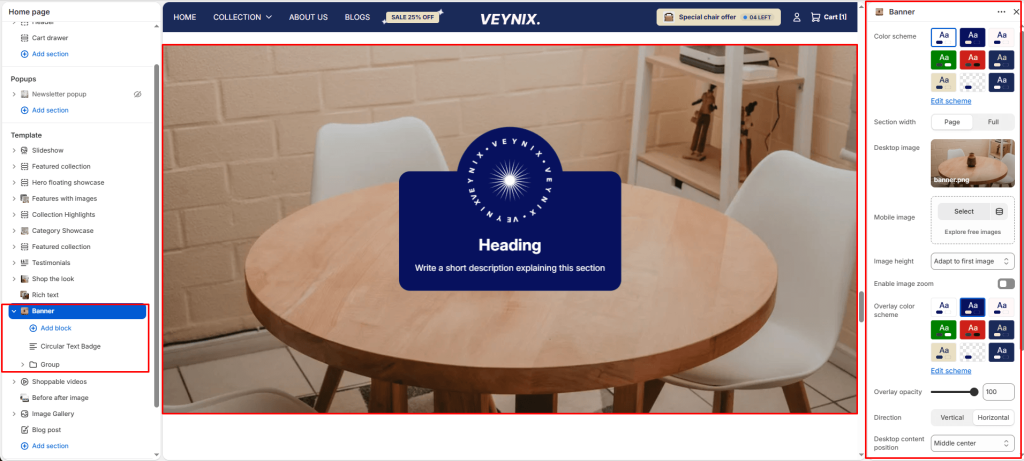
The Banner section is a visually impactful area designed to display a large background image (or video) with optional text overlay content. It’s commonly used on landing pages such as About Us, Collections, or Home, to introduce the page with strong visuals and key messaging.
Section Settings #
Color scheme #
Choose a predefined color scheme to control the section’s background, text, and accent colors, keeping it consistent with the rest of the theme design.
Section width #
Control how wide the section appears on the page.
Options:
- Page
- Full
Desktop image #
Upload a high-quality image optimized for larger screens.
Mobile image #
Optionally upload a separate image optimized for mobile devices to ensure visual clarity and proper scaling on smaller screens.
Image height #
Choose one of the available options from the dropdown.
Options:
- Adapt to first image
- Small
- Medium
- Large
- Full screen
Enable image zoom #
Toggle this feature on or off.
Overlay color scheme #
Choose a color scheme to use for the overlay layer that sits on top of the background image or video.
Overlay opacity #
Adjust the transparency of the overlay layer on top of the background media. Increasing this improves text readability and contrast against busy images.
Direction #
Choose how the content elements are arranged.
Options:
- Vertical
- Horizontal
Desktop content position #
Defines where the overlay content is anchored within the section on desktop screens.
Options:
- Top left
- Top center
- Top right
- Middle left
- Middle center
- Middle right
- Bottom left
- Bottom center
- Bottom right
Top padding #
Add vertical spacing above the section content for better layout balance with the section above it.
Bottom padding #
Add vertical spacing below the section content for better layout balance with the section below it.
This section also accepts global theme content blocks and/or Shopify app blocks (@theme, @app), letting merchants freely add heading, text, image, button, and app-provided blocks inside it.