
Skip to content
Villyit
Villyit
  • Contact
  • Theme Support

getting Starting

1
  • Getting Started

general settings

12
  • Additional Features
  • Cart
  • Product
  • Search
  • Badges
  • Currency codes
  • Social Media
  • Layout
  • Typography
  • Colors
  • Breadcrumbs
  • Logo

header

3
  • Cart drawer
  • Header
  • Announcement bar

sections

34
  • Gallery
  • Logo List
  • Scrolling text
  • Image card
  • Video
  • Image Zigzag
  • Video Testimonials
  • Media grid
  • Highlight testimonial
  • Product bundle
  • Visual story
  • Highlight text with image
  • Testimonials
  • Steps
  • Slideshow
  • Shop the look
  • Rich Text
  • Our team
  • Newsletter
  • Multicolumn
  • Image with Text
  • Image gallery
  • Hero image
  • Hero floating showcase
  • Features with images
  • Featured Collection
  • FAQ
  • Contact Form
  • Collection highlights
  • client logo
  • Category showcase
  • Cart drawer
  • before after image
  • Banner

footer

1
  • Footer

blogs and articles

4
  • Related Post
  • Main Blog
  • Blog Post
  • Article

collections

4
  • Main Collection List
  • Main Collection Banner
  • Main Collection
  • Collection List

product

5
  • Related Products
  • Recently viewed products
  • Featured product
  • Product recommendations
  • Main Product

blocks

15
  • Blocks
  • Heading
  • Text
  • Subheading
  • Slide
  • Rich text
  • Rating
  • Product block
  • Buttons
  • Image
  • Group
  • Countdown
  • Column
  • Circular text badge
  • Breadcrumbs

Popups

1
  • Newsletter Popup
View Categories
  • Home
  • Helpdesk
  • Veynix
  • sections
  • Media grid

Media grid

2 min read

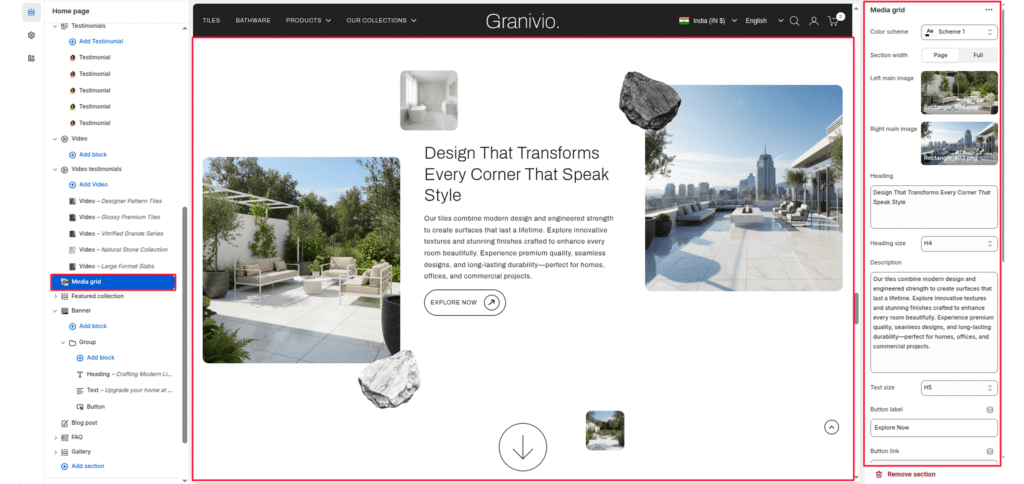
The Media Grid is a high-end storytelling section that uses an asymmetrical layout to showcase lifestyle imagery. It features two primary large images, two smaller supporting images, and two floating “rock” graphics to create a sense of depth and luxury.

Color scheme #

Select your preferred color palette for the background and text.

Section Width #

  • Page: Constrains the content to the theme’s maximum site width.
  • Full: Stretches the section to the edges of the browser window.

Left main image #

The large, vertical image on the left side of the text.

Right main image #

The large, horizontal image on the right side of the text.

Heading #

Enter the main text for the section. This field supports multi-line text to create a bold statement.

Heading Size #

Choose from H1 (largest) to H6 (smallest) to manage visual hierarchy.

Description #

Add a secondary paragraph of text below the heading.

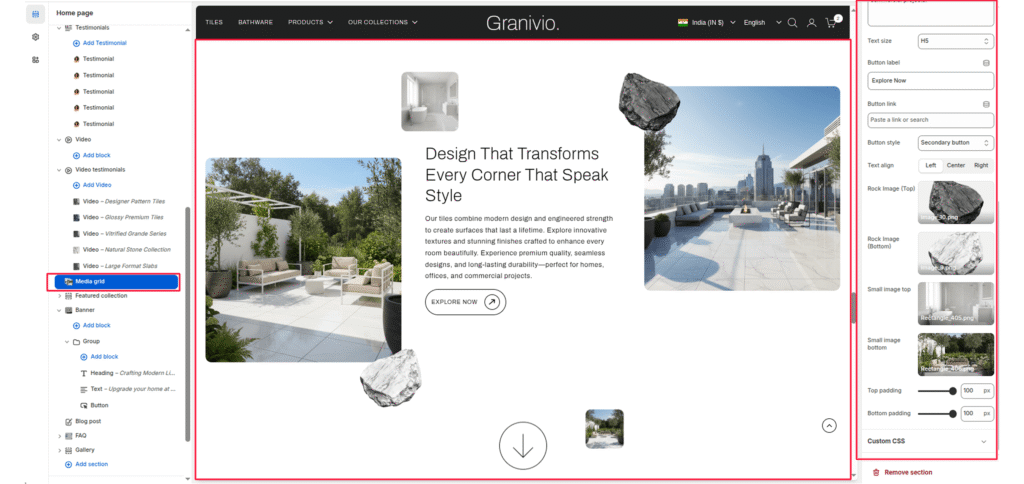
Text Size #

Controls the font size of the description text.

Button Label #

Enter text (e.g., “Shop Now”) to display a call-to-action button.

Button Link #

Paste a URL or select a page/product from the Shopify store.

Button Style #

Choose between available button styles. The styles depend on your theme’s design system.

  • Button icon
  • Primary button
  • Secondary button
  • Full button
  • Link button
  • Button with icon

Text Align #

Set the alignment of the text and button to left, center, or right.
Small image top #

A tiny thumbnail image that floats above the text area.

Small image bottom #

A tiny thumbnail image that floats at the bottom of the grid.

Rock Image (Top) #

A decorative floating element (like a dark stone) placed near the top-right.

Rock Image (Bottom) #

A decorative floating element (like a light stone) placed near the bottom-left.

Top/Bottom Padding #

Adjust the vertical spacing (in pixels) to give the section room to breathe.
Updated on July 3, 2026

What are your Feelings

  • Happy
  • Normal
  • Sad
Share This Article :
  • Facebook
  • X
  • LinkedIn
  • Pinterest

Leave a Reply Cancel reply

Your email address will not be published. Required fields are marked *

Table of Contents
  • Color scheme
  • Section Width
  • Left main image
  • Right main image
  • Heading
  • Heading Size
  • Description
  • Text Size
  • Button Label
  • Button Link
  • Button Style
  • Text Align
  • Small image top
  • Small image bottom
  • Rock Image (Top)
  • Rock Image (Bottom)
  • Top/Bottom Padding
© 2025 Villyit . All Rights Reserved.