
Skip to content
Villyit
Villyit
  • Contact
  • Theme Support

getting Starting

1
  • Getting Started

general settings

12
  • Additional Features
  • Cart
  • Product
  • Search
  • Badges
  • Currency codes
  • Social Media
  • Layout
  • Typography
  • Colors
  • Breadcrumbs
  • Logo

header

3
  • Cart drawer
  • Header
  • Announcement bar

sections

34
  • Gallery
  • Logo List
  • Scrolling text
  • Testimonials
  • Image card
  • Video
  • Image Zigzag
  • Video Testimonials
  • Media grid
  • Highlight testimonial
  • Product bundle
  • Visual story
  • Highlight text with image
  • Steps
  • Slideshow
  • Shop the look
  • Rich Text
  • Our team
  • Newsletter
  • Multicolumn
  • Image with Text
  • Image gallery
  • Hero image
  • Hero floating showcase
  • Features with images
  • Featured Collection
  • FAQ
  • Contact Form
  • Collection highlights
  • client logo
  • Category showcase
  • Cart drawer
  • before after image
  • Banner

footer

1
  • Footer

blogs and articles

4
  • Related Post
  • Main Blog
  • Blog Post
  • Article

collections

4
  • Main Collection List
  • Main Collection Banner
  • Main Collection
  • Collection List

product

5
  • Related Products
  • Recently viewed products
  • Featured product
  • Product recommendations
  • Main Product

blocks

15
  • Blocks
  • Heading
  • Text
  • Subheading
  • Slide
  • Rich text
  • Rating
  • Product block
  • Buttons
  • Image
  • Group
  • Countdown
  • Column
  • Circular text badge
  • Breadcrumbs

Popups

1
  • Newsletter Popup
View Categories
  • Home
  • Helpdesk
  • Veynix
  • sections
  • Scrolling text

Scrolling text

< 1 min read

Scrolling text #

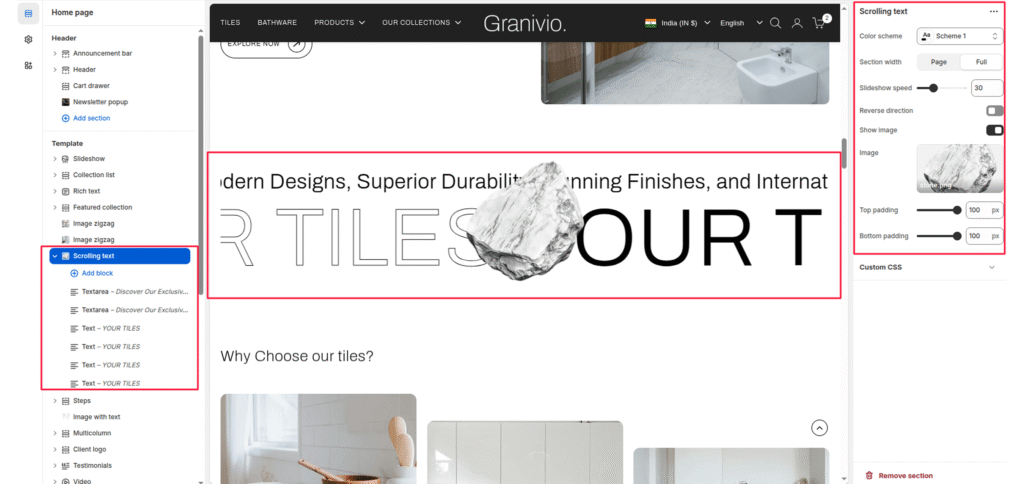
The Scrolling section is designed to showcase various calls-to-action and promotions dynamically. This moving display captures the attention of visitors, making it an effective tool for highlighting key offers and driving engagement.

Color system #

Select a color scheme defined in your theme. This controls the background and text color of the entire section.

Scrolling speed #

Controls the speed of the scrolling marquee (1 = slowest, 100 = fastest). Default: 10.

Pause hover #

When enabled, the scrolling pauses when a user hovers over the slider.

Slider Direction #

Sets the scroll direction of the marquee. Options: Left, Right.

Blocks #

Text: Displays a line of text in the scrolling marquee. Useful for promotions like “UP TO 20% OFF”.

Link: Optional. If provided, the image becomes a clickable link (e.g., to a brand page).

Text size #

Controls the visual size of your description text. Available options typically include:

  • H1
  • H2
  • H3
  • H4
  • H5
  • H6

Show Image #

Enable or disable the floating decorative image (e.g., the stone graphic) that sits over the text.

Image #

Upload the specific image you want to feature as a floating element within the section.
Updated on July 3, 2026

What are your Feelings

  • Happy
  • Normal
  • Sad
Share This Article :
  • Facebook
  • X
  • LinkedIn
  • Pinterest
Table of Contents
  • Scrolling text
  • Color system
  • Scrolling speed
  • Pause hover
  • Slider Direction
  • Blocks
    • Text size
    • Show Image
    • Image
© 2025 Villyit . All Rights Reserved.