
Skip to content
Villyit
Villyit
  • Contact
  • Theme Support

getting Starting

1
  • Getting Started

general settings

12
  • Additional Features
  • Cart
  • Product
  • Search
  • Badges
  • Currency codes
  • Social Media
  • Layout
  • Typography
  • Colors
  • Breadcrumbs
  • Logo

header

3
  • Cart drawer
  • Header
  • Announcement bar

sections

34
  • Gallery
  • Logo List
  • Scrolling text
  • Image card
  • Video
  • Image Zigzag
  • Video Testimonials
  • Media grid
  • Highlight testimonial
  • Product bundle
  • Visual story
  • Highlight text with image
  • Testimonials
  • Steps
  • Slideshow
  • Shop the look
  • Rich Text
  • Our team
  • Newsletter
  • Multicolumn
  • Image with Text
  • Image gallery
  • Hero image
  • Hero floating showcase
  • Features with images
  • Featured Collection
  • FAQ
  • Contact Form
  • Collection highlights
  • client logo
  • Category showcase
  • Cart drawer
  • before after image
  • Banner

footer

1
  • Footer

blogs and articles

4
  • Related Post
  • Main Blog
  • Blog Post
  • Article

collections

4
  • Main Collection List
  • Main Collection Banner
  • Main Collection
  • Collection List

product

5
  • Related Products
  • Recently viewed products
  • Featured product
  • Product recommendations
  • Main Product

blocks

15
  • Blocks
  • Heading
  • Text
  • Subheading
  • Slide
  • Rich text
  • Rating
  • Product block
  • Buttons
  • Image
  • Group
  • Countdown
  • Column
  • Circular text badge
  • Breadcrumbs

Popups

1
  • Newsletter Popup
View Categories
  • Home
  • Helpdesk
  • Veynix
  • sections
  • Visual story

Visual story

< 1 min read

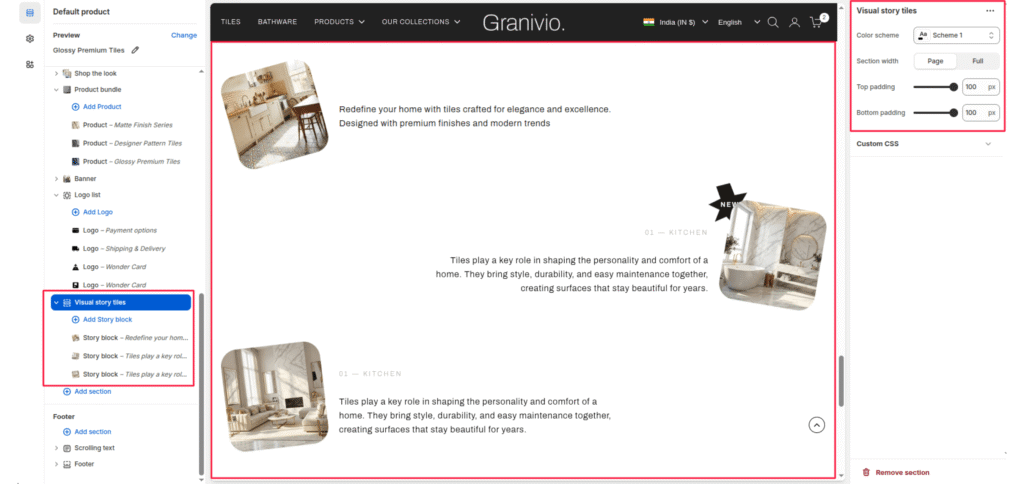
The Visual Story section allows you to present multiple “stories” or features in a unique zigzag layout. This is ideal for showcasing room inspirations, historical timelines, or key design philosophies.

Section Settings #

Color scheme #

Select a predefined color palette to match your theme’s aesthetic.

Section Width #

  • Full: Stretches the section to the edges of the browser window.
  • Page: Constrains the content to the theme’s maximum site width.

Top padding / Bottom padding #

Adjust vertical spacing above and below the section for consistent layout spacing.
Blocks (Story block) #

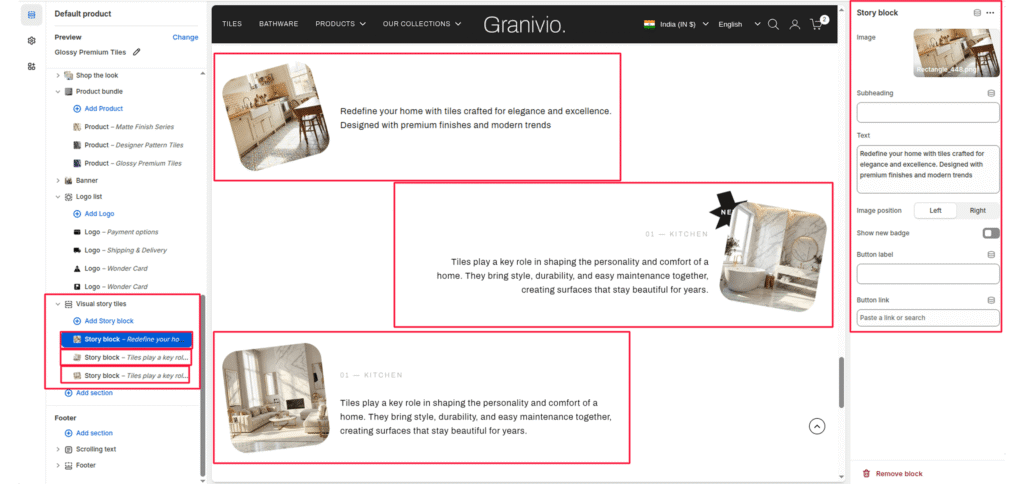
Each story is added as an individual block that can be configured with its own media and text.

Image #

Upload a photo representing the story (e.g., a kitchen or living room interior).

Heading #

Enter a small tag or category name (e.g., “01—KITCHEN”).

Text #

Add the main body content for the story.

Image position #

Toggle between left and right to control which side of the text the image appears on.

Show new badge #

Enable this toggle to add a “NEW” call-out badge to the top corner of the image.

Button label & Link #

Add an optional call-to-action button to direct users to a specific page or collection.
Updated on July 3, 2026

What are your Feelings

  • Happy
  • Normal
  • Sad
Share This Article :
  • Facebook
  • X
  • LinkedIn
  • Pinterest

Leave a Reply Cancel reply

Your email address will not be published. Required fields are marked *

Table of Contents
  • Section Settings
    • Color scheme
    • Section Width
    • Top padding / Bottom padding
    • Blocks (Story block)
      • Image
      • Heading
      • Text
      • Image position
      • Show new badge
      • Button label & Link
© 2025 Villyit . All Rights Reserved.